 Suitaar news
Updates
Maintenance
Posts
suitaar.com
posts 26 October 2026
Alerts in Slack or Discord when a Make scenario or an n8n workflow fails
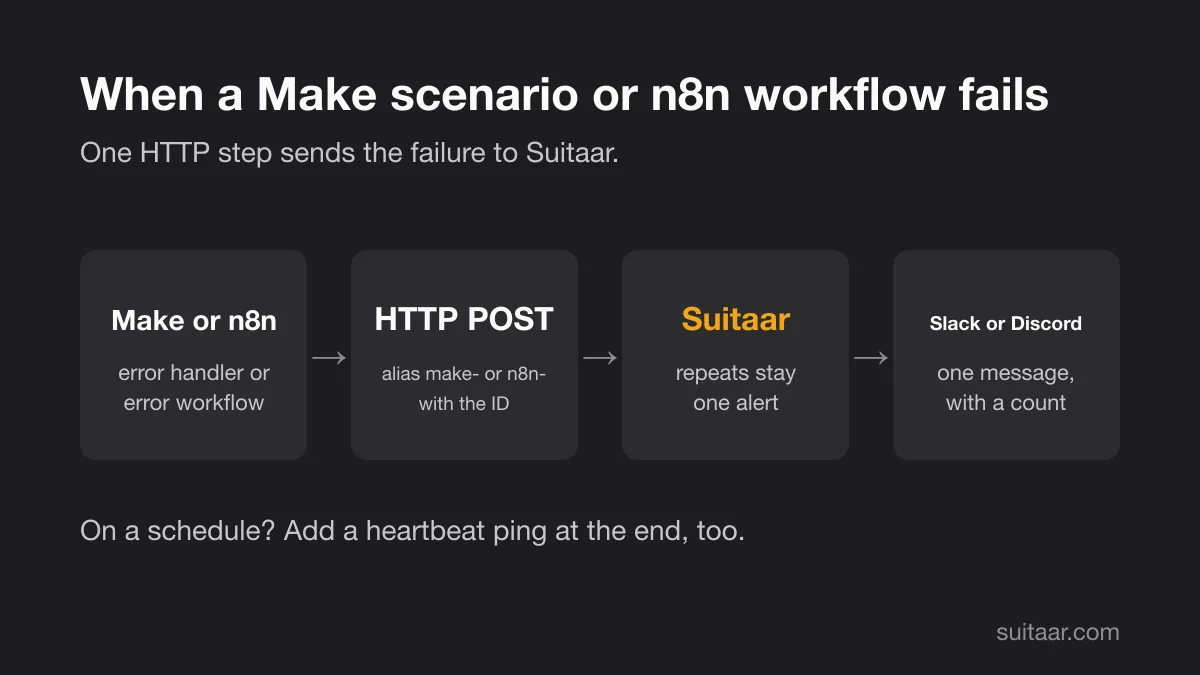
Automations fail quietly. A Make scenario or an n8n workflow that breaks at night may go unnoticed until someone asks why the data is missing. Suitaar (our product) puts those failures in your team’s Slack or Discord channel, with one HTTP step.
Make
- In the scenario, add an error handler to the module that can fail.
- In the error handler route, add an HTTP module: method POST, URL
https://suitaar.com/api/og/v2/alerts, headerAuthorization: GenieKey <your Suitaar key>, and a JSON body withmessage,alias,descriptionandpriority. Use an alias that starts withmake-and has the scenario ID. - Build the body from fields, not from typed JSON text. A value with a quote breaks typed JSON, and Suitaar then refuses the request.
n8n
- Make an error workflow: an Error Trigger node, then an HTTP Request node with method POST, the same URL and header.
- Send the body as JSON with fields (name and value), not as typed JSON text:
| Name | Value |
|---|---|
| message | Workflow failed: |
| alias | n8n- |
| description | `` |
| priority | P3 |
- In the settings of each workflow you want to watch, select this error workflow.
Why the alias matters
The alias groups repeats. A scenario that fails every 5 minutes stays one alert with a count, not a stream of messages. When it works again, close the alert in the Suitaar dashboard or through the API.
When it stops running
For a scenario or workflow on a schedule, add a heartbeat on a source page in Suitaar, and an HTTP step at the end that sends a POST to the heartbeat’s ping URL. When the runs stop, the pings stop, and Suitaar opens an alert.
Setup steps: guide, Make and n8n.
The free plan stays free after the beta: 3 channels, no payment details.