 Suitaar news
Updates
Maintenance
Posts
suitaar.com
posts 26 October 2026
Know when a Zap fails, is turned off, or stops running
A Zap can break in three ways, and Zapier’s own emails cover only part of it:
- A run fails. Zapier emails the Zap’s owner.
- Zapier turns the Zap off. It does this when 95% of its runs fail and it ran more than 20 times in 7 days. After that, the Zap does not run, so no new error comes.
- A scheduled Zap stops running. It has no failed step, so there is no error at all.
Suitaar (our product) can send all three to a team channel in Slack or Discord. These steps use Webhooks by Zapier, which needs a paid Zapier plan. (If you already use Zapier’s OpsGenie app, it works with Suitaar too: see this post.)
1. A run fails
Make a Zap with the trigger Zapier Manager → New Zap Error, for all your Zaps. The action is a Webhooks by Zapier POST to Suitaar, with the alias zap-<Root Id>. Each failing Zap becomes one alert with a count, with links to the failed run and to the Zap.
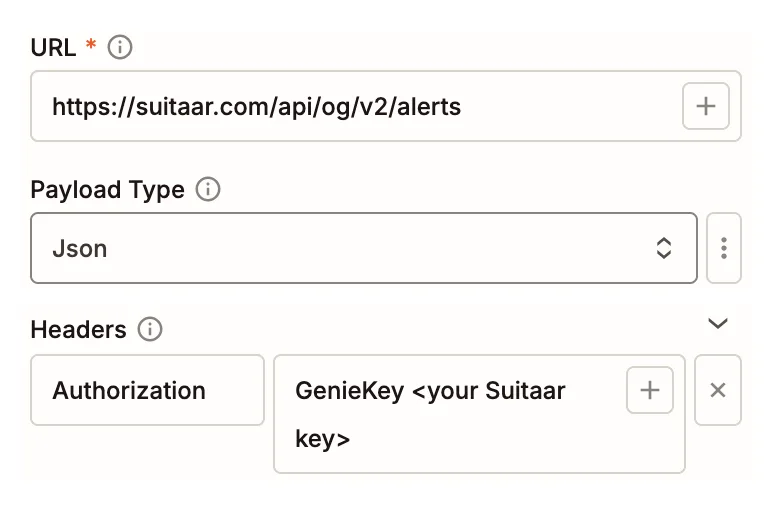 The Webhooks by Zapier step. Use your Suitaar key in place of
<your Suitaar key>.
Turn off Autoreplay in the settings of this Zap and of the Zaps you watch: with Autoreplay on, Zapier sends the error only after its last replay, hours later.
2. Zapier turns a Zap off
A second Zap with the trigger Zapier Manager → Zap Turned Off, and the alias zap-off-<Root Id>. It sends one P2 alert: “This Zap is off. It does not run until someone turns it on again.” Close it by hand when the Zap runs again.
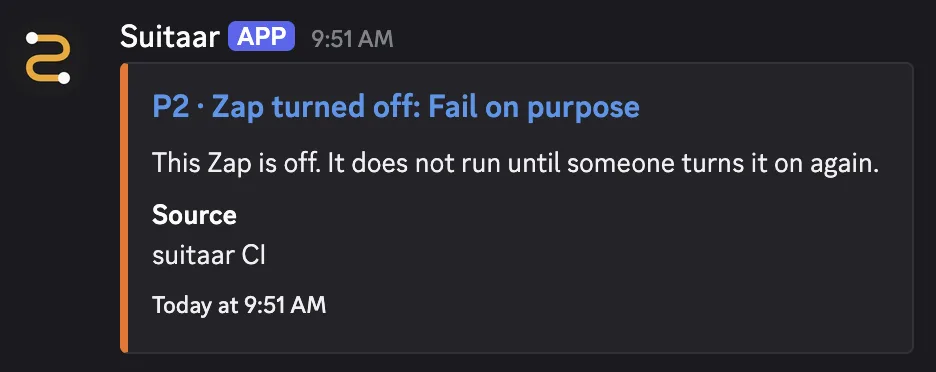 The alert for a Zap that Zapier turned off (a test Zap).
3. A scheduled Zap stops running
Add a heartbeat on a source page in Suitaar, for example daily-zap, with the Zap’s interval and a grace time of 15 minutes or more. Add a last step to the Zap: a POST to the heartbeat’s ping URL. When the Zap stops running, no ping comes, and Suitaar opens an alert. The next ping closes it.
One alert per Zap, per step, or per run
The alias decides the grouping. One alert for each Zap is the default. One alert for each failing step (zap-<Root Id>-<Node Title>) keeps a second failing step from hiding in a count. One alert for each run (zap-<Zap Run Id>) shows every failure on its own.
The full field tables are in the guide: Zapier.
The free plan stays free after the beta: 3 channels, no payment details.